Save
Keep an interface and its source in your library.
 Intelligent UI Desk
A Chrome extension to save supported Intelligent UI from ChatGPT. Use tools in the side panel, keep progress, and sync your library.
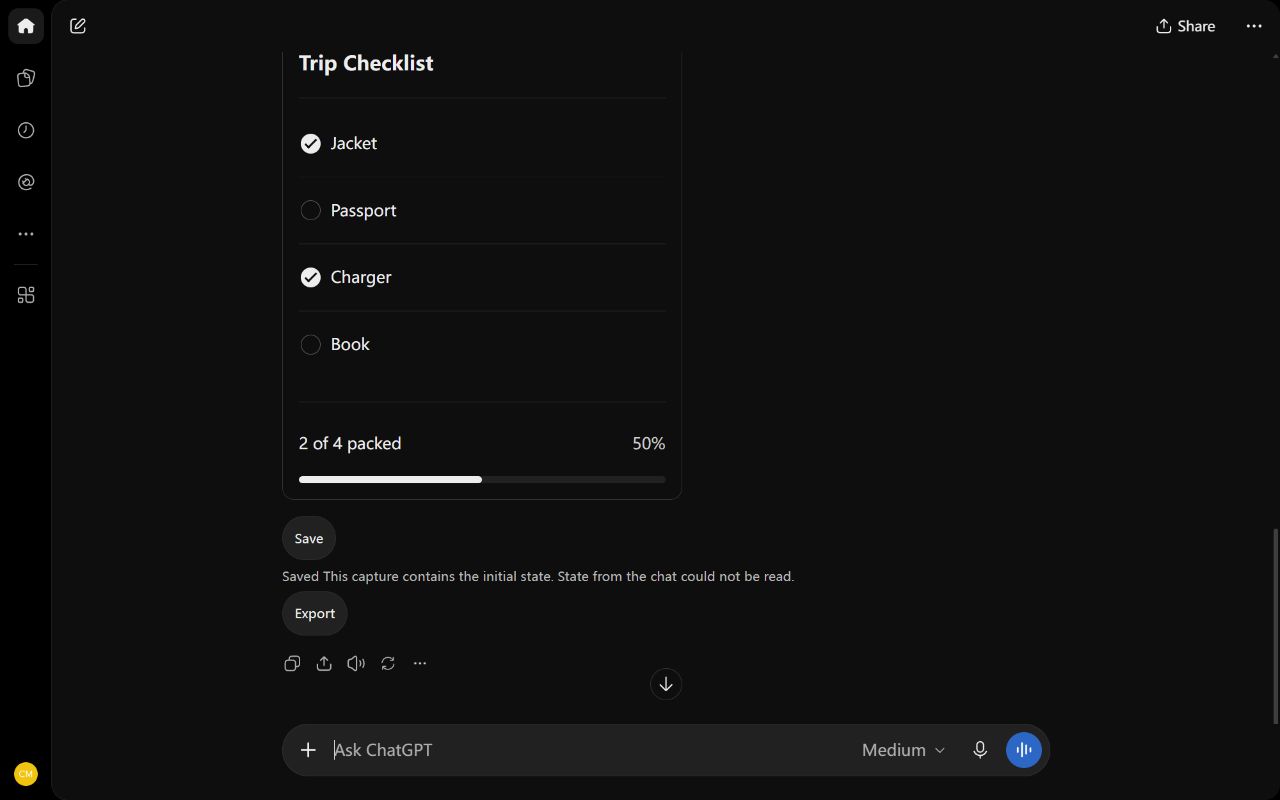
Keep an interface and its source in your library.
Open the tool and work with its buttons, fields, and charts.
Keep each version and its progress for your next task.
Keep names, tags, versions, and progress. Export a backup of your library.
Keep an interface and its source in your library. Capture stores the interface's initial state.
Your account syncs UI and progress between the extension and website. Offline edits stay in this browser. Recovery keeps saved versions.
Pro · US$5/month · US$30/year. Unlimited cloud storage · Unlimited synced UIs · 5 browsers
Intelligent UI Desk is a Chrome extension for people who want to save ChatGPT UI and use it outside the chat. A saved item contains a supported interface, its source, its initial values, and progress from use in the library. Keep a checklist, a counter, a calculator, or a chart in one place when its components are supported. The library gives that tool a name and a place to return to. A saved UI is an interface with controls and state. A conversation export is a record of messages. Intelligent UI Desk keeps the interface rather than the reply around it.
Open a ChatGPT conversation that contains a supported interface and choose Save beside the UI. Intelligent UI Desk reads the messages loaded in that chat; it does not retrieve an entire chat history. Save loaded UI from this chat can collect up to 24 items in one save. Each item keeps the code and data needed by the supported interface. Capture starts with the interface's initial state. Values entered in the original chat are not captured as current progress. After saving, work in the library to create saved progress. A notice explains a capture limit or an unavailable feature, so check the result before relying on it.
Open Intelligent UI Desk in the side panel with its Chrome toolbar icon. Select a saved item and use its supported buttons, fields, lists, and charts while another web page stays open. The side panel fits a wide UI into a preview by scaling its view. Opening the UI uses the captured viewport when that information exists. Older items without a recorded viewport do not have a promised original size. The extension saves progress created through library use. Choose another item when your task changes. Local saving and use need no product account. Interfaces that depend on blocked actions can have features that do not work in the saved copy.
Give a saved tool a name that matches its job, then add tags for the topics you use. Search names or tags when the library grows. Pin an item you return to, or use the recent group to find a tool from your last task. Sort items by name or time. A saved item can contain versions, and the version picker lets you choose the version to use. Each version has its own initial state and saved progress. Reset returns that version to its initial state. Duplicate makes a separate item with its versions and state, which gives a task a separate working copy without changing the first item.
Progress belongs to the saved interface and version you use. In a checklist, that can be the boxes selected in the library; in a supported form, it can be the entered values. Intelligent UI Desk preserves the source with the item so it remains available for review. Copy to clipboard prepares the selected UI, its source, initial values, and current progress. Paste that text into ChatGPT when you want to ask for a change or review. Copying does not send a message. You choose the destination and send action. Review text can contain the data you entered, so read it before sharing it with another service or person.
Sign in to connect the extension and the website to an account library. Cloud sync carries selected UI, versions, and progress under that account. The service checks the signed-in account and registered browser before cloud access. Local use remains available without sign-in, and offline edits remain in the browser until sync can resume. Conflicting changes keep copies instead of discarding one side. Free includes five selected cloud items, 50 MB of cloud storage, and two browsers. Pro costs US$5 per month or US$30 per year, with unlimited cloud storage and synced items for five browsers. Per-transfer and runtime limits remain part of the service.
A library backup is a file for export and restore. New encrypted backup files require sign-in and internet access for both operations, using the account that owns the file key. Backup files do not need an extra encryption password. Local UI and website drafts use a key held by the browser. Account backup keys let the service support file recovery through the account; this is not end-to-end encryption. Keep access to the account used for the backup. Losing that access, a service outage, or deletion of the file key can prevent recovery. Import supports older plain-text backups, and copied text remains a sharing action you choose.
A supported UI can use its saved data and controls for local tasks such as calculations, selections, and charts. Saved code runs in an isolated environment with no network or account access. A feature that needs a remote service or a new ChatGPT response cannot gain that access through the library. A follow-up can open the source chat, but the library does not send a ChatGPT message for you. Delete is permanent: it removes the item, its versions, progress, conflicts, and its copies in cloud backups. Other items remain. Files you exported and the original ChatGPT conversation remain outside that deletion. Review the privacy page for data use and support contact details.
Local saving, offline use, versions and progress are free and need no account. Encrypted backup export and restore need sign-in and internet access.
Intelligent UI Desk saves supported UI and its source from messages loaded in a ChatGPT chat. Limit: 24 items per save. Capture keeps the initial state. The library keeps progress from use.
Free · 5 cloud items · 50 MB · 2 browsers. Pro · US$5/month · US$30/year. Unlimited cloud storage · Unlimited synced UIs · 5 browsers
Delete removes an item's UI, versions, progress, conflicts and cloud backup copies. Other items remain. Exported files and ChatGPT chats remain. Deletion is permanent.
Chrome Web Store · Chrome 116+